
The CEO's Guide to Board Presentation Design: What Fortune 500 Teams Do Differently
- Stephanie Roulic

- Jun 16
- 10 min read
After designing 700+ decks for founders, CEOs, and leadership teams, the same board deck issues keep showing up. Not because the business is weak, but because the slides aren't designed for how boards actually read them.
These design gaps are easy to miss, but they cost approval. Here's where they happen and what to do instead.
Board decks are getting longer.
We regularly see board presentations cross 25, 40, even 60 slides. At the Fortune 500 level, the full board pack can run hundreds of pages. The issue is not always the length. The real problem is that most board deck design has not caught up with how directors actually read.
Board directors do not review a deck like a linear pitch.
They move across sections like performance, financials, strategy, risk, and capital allocation, and the decisions being requested.
They look for what changed since the last meeting.
They scan for where management has conviction.
They re-open the presentation next quarter to check what was promised.
A board presentation is one of the CEO's most important communication documents.
After designing high-stakes presentations for growth-stage startups, leadership teams, and Fortune 500 operating teams, we see the same pattern often: the board deck has the right information, but the design makes the board work too hard to find the point.
The CEOs who present well at this level are not the ones with the most polished slides. They are the ones whose decks read fast, scan cleanly, and leave the room with a decision.
This guide is written for the CEO presenting to a board. We'll cover the do's and don'ts of board deck design, and the 10 key slides that carry every strong presentation.
The Board Deck Is Where Strategy, Finance, Risk, and Leadership All Meet
Most founders build a startup pitch deck to explain everything. Investors read it to understand just enough. That gap is where a lot of friction begins.
Founders build to explain. Investors scan to evaluate.
A board deck is rarely the work of one person. Most teams like strategy, finance, risk, and leadership come together to build a strong board presentation.
The CEO owns the deck. Always. Final sign-off, final voice, final accountability for what gets put in front of the board.
The CFO owns the integrity of the numbers. Revenue, burn, runway, margins, KPIs, forecasts, and variance commentary all need to hold up under board-level scrutiny.
The Chief of Staff, Comms, IR, or Marketing lead often owns the narrative architecture. They decide how the story moves across the deck, what belongs in the main flow, what moves to the appendix, and how each section supports the larger board conversation.
By that point, the deck may carry different:
Visual styles
Chart formats
Visual hierarchy
The information may be right, but the reading experience feels fragmented.
4 Design Mistakes That Make Board Decks Harder to Trust
At M'idea Hub, we see the same pattern across many board presentations. When the design system is missing, four mistakes show up again and again.
1. Information Overload
A board slide often tries to carry too much at once: multiple KPIs, several charts, long commentary, and a table that should have moved to the appendix. At board level, too much detail hides the point.
The board is not looking for everything at once. They are looking for these signals:
● What changed?
● Why did it change?
● What does management believe?
● What decision or discussion is needed?
A strong board slide should make the main point clear in seconds. If it cannot, the slide is showing the work instead of leading with the conclusion.
2. Inconsistent Formatting
Inconsistent formatting is the clearest sign a board deck was built without one system.
Each team brings its own way of building slides. Finance brings tables. Marketing and comms bring branded visuals. Strategy brings text-heavy slides. Risk brings heat maps. Slide by slide, these choices may seem minor. But across 40 to 60 slides, it is the accumulation of small inconsistencies.
Because of this, directors have to adjust to a new visual language. New layouts. New chart styles. Every time they come across a new slide. And that slows down the reading experience.
At M'idea Hub, we treat design as a communication system. Not just a visual cleanup. A board deck at this level needs one standard for all components including;
Visual style
Layouts
Chart and table formats
Brand elements
Consistency does not mean every slide looks the same. It means every slide feels like part of one clear board conversation.
3. No Visual Hierarchy
Visual hierarchy gives directors a clear reading path. It shows them where to look first, what to understand next, and what to treat as supporting detail.
If the headline, chart, table, footnote, and commentary all compete for attention, the board has to figure out what matters first.
Without hierarchy, the most important points get buried:
Key numbers sit inside dense tables
Risks appear as small notes
Decisions get pushed to the bottom
Charts show data without explaining the meaning
Slide titles describe the topic instead of stating the takeaway
This is where design becomes strategic. Strong board slides make the main point visible before the explanation begins.
4. Poor Accessibility
At board level, accessibility is a participation issue, not a design detail.
When a director cannot read the chart, compare the numbers, follow the labels, or understand the color coding, the conversation moves on without them.
This matters more at board level than in any other audience. A typical board has 10 to 12 directors. Roughly one in eight people experience some form of color blindness, and color discrimination weakens with age. On most boards, that means at least one or two directors cannot reliably read a color-coded chart. They rarely call it out. They quietly stop engaging with the section.
It usually happens with:
Tiny font sizes
Low-contrast colors
Overloaded charts
Color-only legends or status indicators
Slides that work on a laptop but fail on a boardroom screen
Slides that look polished on screen but become unreadable when printed
A board deck has to hold up across formats. Pre-read. Boardroom screen. Printed packet. Tablet. Reopened next quarter. A design that works in only one of these fails at board level.
This is where the difference between a reading deck and a presenting deck matters. A board deck has to do both. It supports the live discussion in the room and holds up when directors review it before or after the meeting.
The Do's and Don'ts of Board Deck Design
Do design for fast scanning
Directors should not have to read every word to understand the point of a slide.
Use clear takeaway headlines, visible key numbers, short commentary, and clean chart labels. The slide should make the main message obvious before the detail.
Do create a consistent section flow
A board deck usually moves across performance, financials, strategy, risk, and decisions. Each section should connect to the next.
Use clear section openers, consistent slide structure, and a logical flow from update to implication to decision. This helps the board understand where they are in the conversation.
Do design for big-screen presentation and print
A board deck is not only viewed on one screen.
It may be reviewed as a pre-read, presented in the room, printed, opened on a tablet, or revisited next quarter. Font size, contrast, chart labels, and page density need to work across all formats.
Do lock a single template before any contributor opens a slide
This is where many board decks break. If every contributor starts with a different file, the final deck will carry different layouts, chart styles, title formats, and levels of detail.
Lock the template first. Then ask each contributor to build inside the same system.
Do use whitespace with intention
Whitespace is not empty space. It gives the board room to read, compare, and think.
Crowded slides feel heavy. Clean slides feel controlled. A board deck should use space to separate the main message from the supporting detail.
Don't use inconsistent layouts across sections
Inconsistent layouts make the deck feel stitched together.
Every section does not need to look identical, but the board should feel one clear standard across the full deck.
Don't use tiny fonts to fit everything
If the content only fits at a tiny font size, the slide is trying to do too much.
Move supporting detail to the appendix. Split the slide. Summarize the table. The answer is rarely to make the text smaller.
Don't overload charts with too much data
A board chart should make the pattern easy to see.
Too many data points, colors, labels, and legends force directors to decode the chart before they can discuss what it means. The chart should support the message, not compete with it.
Don't use low-contrast design
Low contrast may look polished on screen, but it often fails in a boardroom or printed packet.
Use enough contrast between text, background, chart labels, and key numbers so the slide reads in every format.
Don't make financial tables look like spreadsheets
Financial slides need discipline.
A table copied from Excel may contain the right numbers, but it often hides the message. Board-level financial tables should be edited, grouped, labeled, and designed so directors can see what changed and why it matters.
These do's and don'ts are communication standards.
A board deck should help the CEO lead the room, help directors find the signal, and help the board move from information to decision. These rules apply across the deck.
The 10 Core Board Presentation Slides

A board deck has more than ten slides. Most run 30 to 60. But every board deck rests on the same ten core slides.
1. Agenda
The agenda sets the structure for the meeting. It tells the board what is being covered, in what order, and how long each section gets.
Outline the meeting structure and the topics in each section
Use clear numbering so the board can reference where they are

2. Executive Summary
The executive summary gives the board the full quarter in one slide. It sits at the front of the deck so directors who only have time for one slide still walk in informed.
Lead with what changed, what is on track, and what needs a decision
Use a clean layout and put the most important number in the largest visual position

3. Financial Performance
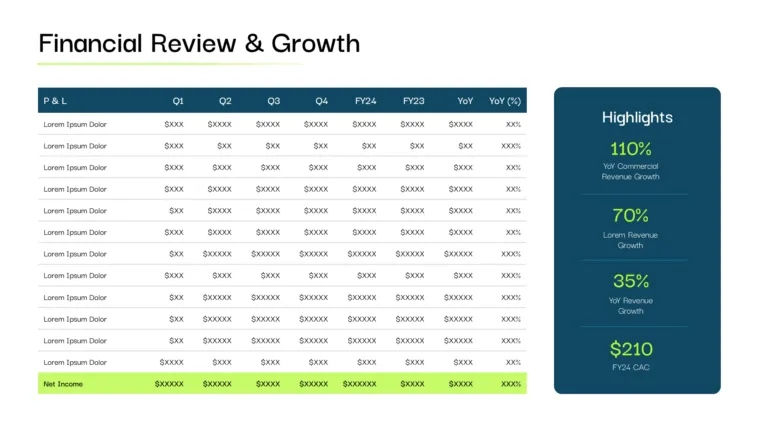
Financial performance is the slide the board reads first. Revenue trends, expenses, and the variance against the plan should land in seconds, not paragraphs.
Use charts for trends, clean tables for key figures
Highlight what shifted since the last meeting and why

4. KPI Review
The KPI slide is where the board sees what is on track and what is not. The strongest KPI slides operate as a dashboard, not a spreadsheet.
Show the metrics that matter: MRR, ARR, CAC, LTV, churn, or the equivalent for your business
Use clear performance indicators against the plan, not just absolute numbers

5. Strategic Initiatives
This is the slide the board reads to understand what is next. Product launches, expansion plans, upcoming projects, with timelines and ownership.
Show key initiatives, market expansions, and launch timelines
Use timelines, milestone markers, and progress indicators for storytelling

6. Product-Market Fit
Product-market fit is the slide that shows whether the product is working in the market.
Use growth and retention charts to show traction
Add customer stories with clean quotes or named logos
Use icons sparingly for visual support, not decoration

7. Operational Highlights
Operational highlights show how the company is running. Efficiency gains, process changes, and the operational risks the board should know about.
Use flowcharts, process diagrams, or simple infographics for operational metrics

8. Market Landscape
The market landscape slide shows the board where the company sits in the industry. Market trends, competitor movements, and the openings the company is working to close.
Use market growth graphs, competitor matrices, and positioning maps
Add competitor logos for visual context

9. Leadership and Organizational Update
The leadership slide updates the board on key hires, departures, and changes in the org structure. Boards approve strategic initiatives partly based on whether they trust the team executing them.
Use leadership profiles with photos and short role context
Flag any open senior roles and the timeline to fill them

10. Success Stories
The closing slide reinforces what is working. Customer wins, named partnerships, and recent product milestones the board should know about.
Use testimonials, before-and-after case studies, and customer logos
Keep it short. The slide should reinforce confidence, not become a sales pitch

A Working Calendar for the First-Time CEO Presenter
If this is your first board meeting as CEO, use this calendar as a starting point to build an impactful board presentation.
Week | Goal | What needs to be done |
Week 1 | Define the meeting | Define the main board decision, ask, or discussion point. Decide the section flow: performance, financials, strategy, risk, capital allocation, decisions. Assign ownership across CEO, CFO, Chief of Staff, IR, Comms, and functional teams. Lock what belongs in the main deck vs. the appendix. |
Week 2 | Align the content | Ask every contributor to submit content for their slides. Remove duplicate updates across teams. Identify where charts, tables, dashboards, or visuals will be needed. |
Week 3 | Build the design system | Lock the design system - define typography, chart style, colors, spacing, icons, tables, section dividers, and appendix layout. Create consistent formats for KPI slides, financial slides, roadmap slides, risk slides, and decision slides. |
Week 4 | Design, refine, and review | Refine the approved content into a clean, structured board presentation. Check every slide for hierarchy: headline, key metric, visual proof, implication. Simplify dense charts and spreadsheet-style financial slides. Test readability on laptop, tablet, projector, and print. |
Final 48 hours | Control last-minute changes | Freeze the structure before edits become chaotic. Only allow changes that improve accuracy, clarity, or board readiness. Avoid redesigning layouts at the last minute. |
A strong board deck should feel structured, consistent, decision-led, and easy for directors to scan before the meeting. That is what gives the CEO more control in the room.
What This Comes Down To
What separates strong board decks from weak ones is a short list:
The CEO owns the deck. The whole company builds it. Ten contributors send slides into the master file. Without a single design owner, the deck reads as ten decks stapled together.
Information is rarely the problem. The reading experience is. Directors flip back, re-read, and lose the rhythm of the deck because the design has not caught up with how they actually read.
4 mistakes break almost every board deck. Information overload, inconsistent formatting, no visual hierarchy, and poor accessibility. Each one is fixable. None of them are cosmetic.
A board deck has to work in two readings. Once when the board reads it alone before the meeting. Again when the CEO presents it in the room. Strong slides hold up in both.
The design system locks in week 3, not week 4. Most decks fail in the final 48 hours because the structure was never frozen earlier.
A strong board deck reads fast, scans cleanly, and leaves the room with a decision. That outcome is design work, not polish. It comes from treating the deck as a communication system.
If your next board meeting is on the calendar and the deck is not doing the work the business deserves, happy to take a look. We have designed 50+ board decks. We know where the time goes, where the slides break, and what directors actually flag.
About the author: With 700+ presentations designed and zero missed deadlines, Kirk Patel helps VC & PE firms and their portfolio companies communicate with clarity when it matters most. From fundraising decks to board updates and annual meetings, his work has supported billions raised and lasting LP trust. Reach out to learn more.


